Last week, the Quest vWorkspace guys showed their prowess once again when they released the first version of the vWorkspace PowerPack for PowerGUI® Pro and PowerGUI®. I love this PowerPack because it really demonstrates how PowerGUI is so complementary to PowerShell. To see what I mean, take a look at the following screenshot:
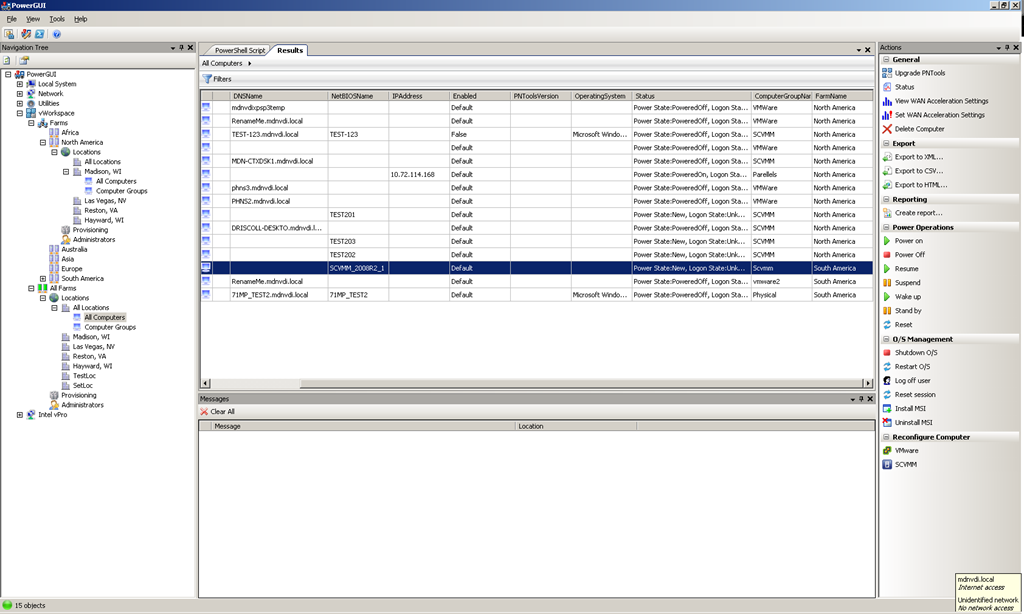
This screenshot shows two major improvements to the vWorkspace management experience by demonstrating how you can use the vWorkspace PowerPack to perform management tasks across all farms, and by demonstrating how you can use the vWorkspace PowerPack to perform management tasks across all locations in a single farm or across all locations in all farms. In the native vWorkspace management user interface, you can only work with one farm at a time, and you can only work with one location at a time.
Scaling management tasks out in a product like this can take a long time when you need to build the capabilities into a native management user interface, and these days in many cases PowerShell is provided as the vehicle to satisfy larger scale automation and management needs. PowerShell is great and it definitely fits the bill for these medium to large enterprise needs, however it does not provide a user interface to facilitate those management scenarios. This is where the administrative console in PowerGUI Pro and PowerGUI really shines, because it allows you to build out rich PowerPacks with enterprise-ready solutions with very low cost and effort.
I spoke directly with Adam Driscoll (author of PowerGUI VSX, member of the vWorkspace team, and one of two developers who created the vWorkspace PowerPack) about this, and it took them less than one week to put this PowerPack together. That’s less than one week for two developers to create a rich, functional management user interface that not only provides many of the management capabilities that come with the vWorkspace management console, but that also adds additional enterprise capabilities that the vWorkspace management console does not provide natively. Aside from the multi-farm management and multi-location management features I mentioned earlier, it also allows administrators to upgrade the vWorkspace VM tools on the VMs you select, and it simplifies how administrators search for provisioning objects like templates, sysprep customizations, parent VHDs, and so on. And by building these capabilities into a PowerPack, vWorkspace administrators can perform custom filtering and sorting of the data in the grid, generate rich HTML reports for that data, export the data to an external file for use in other programs, and view the PowerShell scripts that are doing all of the work, all because those features come with the PowerGUI administrative console automatically. That’s an amazing feat for one weeks worth of effort!
The really sweet part of all of this is that it gets even better very soon. If you’ve been following my blog recently you’ve seen that we have released two betas of PowerGUI Pro 3.0 in the last little while which comes with many great features worth highlighting, however for now I only want to mention one: MobileShell. In PowerGUI Pro 3.0, you can provide administrators with a custom mobile management solution, defined using PowerPacks and tailored for their needs using role-based access control (RBAC). That means that once we release PowerGUI Pro 3.0 (which should happen very soon), the vWorkspace guys will be able to publish an update to their PowerPack that enables mobile management support so that vWorkspace administrators can have a mobile management solution for very little cost! All they will need once the vWorkspace PowerPack is updated to support this mobile management scenario is a license of PowerGUI Pro 3.0 for each administrator who wants to manage their vWorkspace environment from their webkit-enabled mobile device. Considering that it also allows those administrators to create executable files from PowerShell scripts, work with integrated version control in a best-in-class script editor, manage systems remotely using easy PowerShell remoting capabilities, find functions they are working with using go to definition support for functions, and more, the PowerGUI Pro price of $199/user is a pretty good value.
If you are at all interested in VDI, you should give vWorkspace a look because it’s an awesome solution that keeps getting better all the time. If you use vWorkspace already I encourage you to take a look at the PowerShell capabilities that this team is providing, particularly in the PowerPack, because a ton of additional value is being provided here that is worth checking out. You can find the installation instructions for the PowerPack on the vWorkspace PowerPack page on PowerGUI.org.
That’s it for this post. If you have any questions or feedback, please don’t hesitate to reply in the comments below.
Thanks!
Kirk out.

 Poshoholic