PowerCLI 4.1: A fork in the road

UPDATE 10-JAN-11: To deal with the issues identified below, I published a beta version of the VMware vSphere PowerPack with PowerCLI 4.1 or later support.  You can read more about the beta and how to install it here.

Earlier this week, VMware released version 4.1 of the PowerCLI.  This release brings some great improvements that the community has been waiting for, and you can read about them on the VMware PowerCLI site and a number of other blogs that have been publicizing the release.  I’m not here to talk about the new features and improvements however.  I’m writing this to notify you about the breaking changes that were introduced in this release that haven’t been discussed externally but that you will want to know about.

With version 4.1 of the PowerCLI, the VMware team has changed the namespaces used in the object model behind the PowerCLI.  The objects themselves have stayed the same, but the namespaces have changed.  This change has a number of impacts once PowerCLI 4.1 is installed, including but not limited to the following:

  • Any PowerShell function that uses strongly typed parameter names with the VMware PowerCLI 4.0 or earlier type names will no longer function properly without an update.
  • Any PowerShell script that uses the is or as operators with the VMware PowerCLI 4.0 or earlier type names type names will no longer function properly without an update.
  • Any PowerGUI extensions (read: PowerPacks) written for PowerCLI 4.0 or earlier will no longer function properly without an update.
  • Any PowerShell scripts that use the VMware PowerCLI 4.0 or earlier type names inside of Add-Type calls will no longer function properly.

In general, any code or script written that is dependent on these type names will have issues once you upgrade to PowerCLI 4.1.  It also means that once these items that don’t work with 4.1 are updated, they may no longer work with PowerCLI 4.0 and earlier.  Also note that these are just PowerShell-related impacts.  If you’re using other languages to manage or automate VMware you need to be aware of the impacts for those languages as well. Here are a few PowerShell-specific examples of the impact of these breaking changes:

  1. The PowerCLI Community Extensions won’t work with PowerCLI 4.1 until they have been updated, and once they have been updated they will not work with PowerCLI 4.0 and earlier as long as they continue to use strongly typed parameter names (which they should).
  2. Scripts on PoshCode like this one and this one will suffer the same fate since they use strongly typed parameters in the advanced functions.
  3. Blog posts like this one from Glenn Sizemore and this one by Maish Saidel-Keesing will only work with PowerCLI 4.0 and earlier unless they are updated.
  4. The VMware Infrastructure PowerPack for PowerGUI and the Virtualization EcoShell will return data from the nodes, however actions will not appear and icons and charts will not show up in the grid.
  5. The VMware Community PowerPack for PowerGUI and the Virtualization EcoShell will return data from the nodes, however actions will not appear and icons and charts will not show up in the grid.
  6. Any blog posts that mentions PowerCLI object types will now be out of date.
  7. Books like this one will contain examples that are now broken.

As you can see, the PowerCLI 4.1 release comes with changes that are pretty far reaching, and they are definitely going to cause confusion in the community.  Unfortunately, since these changes are now in the wild, we’re at a fork in the road where some community contributions will only support 4.0 and earlier for a while and others, as they start supporting 4.1 and later, may only support 4.1 and later depending on how they add that support.  Changes like this are never fun, so please be aware of these changes when considering when to upgrade PowerCLI in your environment. As far as the PowerPack issues go, we will add support for the PowerCLI 4.1 release to the VMware Infrastructure PowerPack soon, but it will take a little while for us to work out the details and do the appropriate testing.  Until then, please don’t upgrade the PowerCLI on your systems where you use the VMware Infrastructure PowerPack. Thanks, Kirk out.

Share this post:

Discover dormant AD accounts with the Windows Security PowerPack

Last week I had the pleasure of participating in a webinar with Randy Franklin Smith of Ultimate Windows Security fame where we demonstrated and discussed the Windows Security PowerPack that was recently published in the PowerPack Library.  Randy’s a great guy to present with and this webinar was a lot of fun.  Judging by the amount of questions and positive feedback we’ve received, it seemed to generate a lot of interest  as well.

A recording of the webinar is now available, so if you missed catching it live you can go here and watch it at your leisure.  You won’t be able to ask questions during the presentation of course, but that’s what the comments on this blog and the PowerGUI Forums are for. 🙂

Enjoy!

Kirk out.

Share this post:

PowerShell Quick Tip: Getting all of the members of an object

If you weren’t already aware, using the Get-Member cmdlet is essential to understanding what you can do with PowerShell.  Get-Member allows you to identify the members (properties, methods, events, etc.) that are available on the objects you are working with.  What some people don’t realize with Get-Member however is that by default it does not identify all members that are available on the objects that are passed into it.

For example, let’s take a look at how you might use Get-Member to see what you can do with Win32_BIOS objects, like this:

Get-WmiObject Win32_BIOS | Get-Member

That command yields the following results:

   TypeName: System.Management.ManagementObject#root\cimv2\Win32_BIOS

Name                  MemberType   Definition
—-                  ———-   ———-
BiosCharacteristics   Property     System.UInt16[] BiosCharacteristics {get;set;}
BIOSVersion           Property     System.String[] BIOSVersion {get;set;}
BuildNumber           Property     System.String BuildNumber {get;set;}
Caption               Property     System.String Caption {get;set;}
CodeSet               Property     System.String CodeSet {get;set;}
CurrentLanguage       Property     System.String CurrentLanguage {get;set;}
Description           Property     System.String Description {get;set;}
IdentificationCode    Property     System.String IdentificationCode {get;set;}
InstallableLanguages  Property     System.UInt16 InstallableLanguages {get;set;}
InstallDate           Property     System.String InstallDate {get;set;}
LanguageEdition       Property     System.String LanguageEdition {get;set;}
ListOfLanguages       Property     System.String[] ListOfLanguages {get;set;}
Manufacturer          Property     System.String Manufacturer {get;set;}
Name                  Property     System.String Name {get;set;}
OtherTargetOS         Property     System.String OtherTargetOS {get;set;}
PrimaryBIOS           Property     System.Boolean PrimaryBIOS {get;set;}
ReleaseDate           Property     System.String ReleaseDate {get;set;}
SerialNumber          Property     System.String SerialNumber {get;set;}
SMBIOSBIOSVersion     Property     System.String SMBIOSBIOSVersion {get;set;}
SMBIOSMajorVersion    Property     System.UInt16 SMBIOSMajorVersion {get;set;}
SMBIOSMinorVersion    Property     System.UInt16 SMBIOSMinorVersion {get;set;}
SMBIOSPresent         Property     System.Boolean SMBIOSPresent {get;set;}
SoftwareElementID     Property     System.String SoftwareElementID {get;set;}
SoftwareElementState  Property     System.UInt16 SoftwareElementState {get;set;}
Status                Property     System.String Status {get;set;}
TargetOperatingSystem Property     System.UInt16 TargetOperatingSystem {get;set;}
Version               Property     System.String Version {get;set;}
__CLASS               Property     System.String __CLASS {get;set;}
__DERIVATION          Property     System.String[] __DERIVATION {get;set;}
__DYNASTY             Property     System.String __DYNASTY {get;set;}
__GENUS               Property     System.Int32 __GENUS {get;set;}
__NAMESPACE           Property     System.String __NAMESPACE {get;set;}
__PATH                Property     System.String __PATH {get;set;}
__PROPERTY_COUNT      Property     System.Int32 __PROPERTY_COUNT {get;set;}
__RELPATH             Property     System.String __RELPATH {get;set;}
__SERVER              Property     System.String __SERVER {get;set;}
__SUPERCLASS          Property     System.String __SUPERCLASS {get;set;}
PSStatus              PropertySet  PSStatus {Status, Name, Caption, SMBIOSPresent}
ConvertFromDateTime   ScriptMethod System.Object ConvertFromDateTime();
ConvertToDateTime     ScriptMethod System.Object ConvertToDateTime();

That’s a pretty good list of 40 members, but there are actually many more that you might like to see as well.  For example, it can be useful to see the different member sets available on an object as well as any get_ and set_ methods that object has.  You can see that information by using the –Force parameter with Get-Member.  It can also be useful to see any hidden members that an object has, whether they come from the base member set, extended member set, or adapted member set.  To see all of these hidden members, you can use the –View parameter and specify you want to see members from All views.  When you put the –Force and –View parameters together, you end up with the following command:

Get-WmiObject Win32_BIOS | Get-Member -Force -View All

Running that command yields the following results:

   TypeName: System.Management.ManagementObject#root\cimv2\Win32_BIOS

Name                      MemberType            Definition
—-                      ———-            ———-
pstypenames               CodeProperty          System.Collections.ObjectModel.Collection`1[[System.String, mscorlib…
Disposed                  Event                 System.EventHandler Disposed(System.Object, System.EventArgs)
psadapted                 MemberSet             psadapted {__GENUS, __CLASS, __SUPERCLASS, __DYNASTY, __RELPATH, __P…
psbase                    MemberSet             psbase {Scope, Path, Options, ClassPath, Properties, SystemPropertie…
psextended                MemberSet             psextended {ConvertToDateTime, ConvertFromDateTime, PSStatus}
psobject                  MemberSet             psobject {Members, Properties, Methods, ImmediateBaseObject, BaseObj…
PSStandardMembers         MemberSet             PSStandardMembers {DefaultDisplayPropertySet}
add_Disposed              Method                System.Void add_Disposed(System.EventHandler value)
Clone                     Method                System.Object Clone()
CompareTo                 Method                bool CompareTo(System.Management.ManagementBaseObject otherObject, S…
CopyTo                    Method                System.Management.ManagementPath CopyTo(System.Management.Management…
CreateObjRef              Method                System.Runtime.Remoting.ObjRef CreateObjRef(type requestedType)
Delete                    Method                System.Void Delete(), System.Void Delete(System.Management.DeleteOpt…
Dispose                   Method                System.Void Dispose()
Equals                    Method                bool Equals(System.Object obj)
Get                       Method                System.Void Get(), System.Void Get(System.Management.ManagementOpera…
GetHashCode               Method                int GetHashCode()
GetLifetimeService        Method                System.Object GetLifetimeService()
GetMethodParameters       Method                System.Management.ManagementBaseObject GetMethodParameters(string me…
GetPropertyQualifierValue Method                System.Object GetPropertyQualifierValue(string propertyName, string …
GetPropertyValue          Method                System.Object GetPropertyValue(string propertyName)
GetQualifierValue         Method                System.Object GetQualifierValue(string qualifierName)
GetRelated                Method                System.Management.ManagementObjectCollection GetRelated(), System.Ma…
GetRelationships          Method                System.Management.ManagementObjectCollection GetRelationships(), Sys…
GetText                   Method                string GetText(System.Management.TextFormat format)
GetType                   Method                type GetType()
get_ClassPath             Method                System.Management.ManagementPath get_ClassPath()
get_Container             Method                System.ComponentModel.IContainer get_Container()
get_Item                  Method                System.Object get_Item(string propertyName)
get_Options               Method                System.Management.ObjectGetOptions get_Options()
get_Path                  Method                System.Management.ManagementPath get_Path()
get_Properties            Method                System.Management.PropertyDataCollection get_Properties()
get_Qualifiers            Method                System.Management.QualifierDataCollection get_Qualifiers()
get_Scope                 Method                System.Management.ManagementScope get_Scope()
get_Site                  Method                System.ComponentModel.ISite get_Site()
get_SystemProperties      Method                System.Management.PropertyDataCollection get_SystemProperties()
InitializeLifetimeService Method                System.Object InitializeLifetimeService()
InvokeMethod              Method                System.Object InvokeMethod(string methodName, System.Object[] args),…
Put                       Method                System.Management.ManagementPath Put(), System.Management.Management…
remove_Disposed           Method                System.Void remove_Disposed(System.EventHandler value)
SetPropertyQualifierValue Method                System.Void SetPropertyQualifierValue(string propertyName, string qu…
SetPropertyValue          Method                System.Void SetPropertyValue(string propertyName, System.Object prop…
SetQualifierValue         Method                System.Void SetQualifierValue(string qualifierName, System.Object qu…
set_Item                  Method                System.Void set_Item(string propertyName, System.Object value)
set_Options               Method                System.Void set_Options(System.Management.ObjectGetOptions value)
set_Path                  Method                System.Void set_Path(System.Management.ManagementPath value)
set_Scope                 Method                System.Void set_Scope(System.Management.ManagementScope value)
set_Site                  Method                System.Void set_Site(System.ComponentModel.ISite value)
ToString                  Method                string ToString()
Item                      ParameterizedProperty System.Object Item(string propertyName) {get;set;}
BiosCharacteristics       Property              System.UInt16[] BiosCharacteristics {get;set;}
BIOSVersion               Property              System.String[] BIOSVersion {get;set;}
BuildNumber               Property              System.String BuildNumber {get;set;}
Caption                   Property              System.String Caption {get;set;}
ClassPath                 Property              System.Management.ManagementPath ClassPath {get;}
CodeSet                   Property              System.String CodeSet {get;set;}
Container                 Property              System.ComponentModel.IContainer Container {get;}
CurrentLanguage           Property              System.String CurrentLanguage {get;set;}
Description               Property              System.String Description {get;set;}
IdentificationCode        Property              System.String IdentificationCode {get;set;}
InstallableLanguages      Property              System.UInt16 InstallableLanguages {get;set;}
InstallDate               Property              System.String InstallDate {get;set;}
LanguageEdition           Property              System.String LanguageEdition {get;set;}
ListOfLanguages           Property              System.String[] ListOfLanguages {get;set;}
Manufacturer              Property              System.String Manufacturer {get;set;}
Name                      Property              System.String Name {get;set;}
Options                   Property              System.Management.ObjectGetOptions Options {get;set;}
OtherTargetOS             Property              System.String OtherTargetOS {get;set;}
Path                      Property              System.Management.ManagementPath Path {get;set;}
PrimaryBIOS               Property              System.Boolean PrimaryBIOS {get;set;}
Properties                Property              System.Management.PropertyDataCollection Properties {get;}
Qualifiers                Property              System.Management.QualifierDataCollection Qualifiers {get;}
ReleaseDate               Property              System.String ReleaseDate {get;set;}
Scope                     Property              System.Management.ManagementScope Scope {get;set;}
SerialNumber              Property              System.String SerialNumber {get;set;}
Site                      Property              System.ComponentModel.ISite Site {get;set;}
SMBIOSBIOSVersion         Property              System.String SMBIOSBIOSVersion {get;set;}
SMBIOSMajorVersion        Property              System.UInt16 SMBIOSMajorVersion {get;set;}
SMBIOSMinorVersion        Property              System.UInt16 SMBIOSMinorVersion {get;set;}
SMBIOSPresent             Property              System.Boolean SMBIOSPresent {get;set;}
SoftwareElementID         Property              System.String SoftwareElementID {get;set;}
SoftwareElementState      Property              System.UInt16 SoftwareElementState {get;set;}
Status                    Property              System.String Status {get;set;}
SystemProperties          Property              System.Management.PropertyDataCollection SystemProperties {get;}
TargetOperatingSystem     Property              System.UInt16 TargetOperatingSystem {get;set;}
Version                   Property              System.String Version {get;set;}
__CLASS                   Property              System.String __CLASS {get;set;}
__DERIVATION              Property              System.String[] __DERIVATION {get;set;}
__DYNASTY                 Property              System.String __DYNASTY {get;set;}
__GENUS                   Property              System.Int32 __GENUS {get;set;}
__NAMESPACE               Property              System.String __NAMESPACE {get;set;}
__PATH                    Property              System.String __PATH {get;set;}
__PROPERTY_COUNT          Property              System.Int32 __PROPERTY_COUNT {get;set;}
__RELPATH                 Property              System.String __RELPATH {get;set;}
__SERVER                  Property              System.String __SERVER {get;set;}
__SUPERCLASS              Property              System.String __SUPERCLASS {get;set;}
PSStatus                  PropertySet           PSStatus {Status, Name, Caption, SMBIOSPresent}
ConvertFromDateTime       ScriptMethod          System.Object ConvertFromDateTime();
ConvertToDateTime         ScriptMethod          System.Object ConvertToDateTime();

That result set shows 99 members, which is a lot more than the 40 members you get to see by default!

As you can see, there is a lot more to these objects than meets the eye.  Using Get-Member with –Force and –View All is a great way to get all of the information you need about objects so that you really know what your objects contain and are capable of.

Kirk out.

Share this post :

PowerGUI Visual Studio is now in beta!

Due to popular demand, Adam Driscoll has just released Beta 1 of his PowerGUI Visual Studio (aka PowerGUI VSX) project!

If you missed my blog about this last week and don’t know what this product is, it’s an extension for Visual Studio that adds PowerGUI’s editor with Intellisense, syntax highlighting and snippets for PowerShell script files to Visual Studio!  This can make it much easier to create PowerShell scripts or modules if you’re already working inside Visual Studio.

You can learn all about this great project and download the beta release by going to the PowerGUI VSX page on CodePlex now!

This project requires that the following prerequisites be installed first:

Please share any feedback you have for this release in the comments on this blog, on the CodePlex site itself, or on the PowerGUI forums.

Enjoy!

Kirk out.

Share this post:

PowerShell support in Visual Studio!

Update 20-Jun-2010: This is now released as a beta! It supports Intellisense and Syntax Highlighting for any modules you have loaded in PowerGUI, as well as PowerGUI Snippets! Go download it here now!

Here’s something really cool for all the developer types out there.  Adam Driscoll, one of the developers here at Quest Software, is working on an extension for Visual Studio 2010 that integrates PowerGUI Script Editor functionality into the Visual Studio 2010 IDE!  It’s not released yet, but you can learn more about it on the PowerGUI VSX site on CodePlex.  Here’s a teaser screenshot to whet your tastebuds:

I’d love to hear your feedback on this, so please leave comments and let me know if this is of interest to you or not.

Thanks,

Kirk out.

Share this post:

PowerGUI 2.1: The release that keeps on giving

Last Monday while I was down at Tech·Ed we quietly released PowerGUI 2.1 on our website.  I’ve been looking forward to us getting this release out the door for quite a while because there are some really cool features in the release that I wanted to share with you (some of which I’ve been hinting about on my blog recently), so it was very exciting to see this get released.  Since it happened at Tech·Ed though, my schedule was completely booked and I just couldn’t find a minute to start blogging about the release.  Now that I’m back home and fully recovered from a week packed with all sorts of cool technology, I can catch up and share this release with the rest of you.

Aside from the great performance improvements that were made in the Script Editor, not to mention the Charts and custom HTML support in the administrative console, there’s one particular feature that really grabbed my attention in this release: we now have a documented and supported SDK for the PowerGUI Script Editor!  This is great news because up to this point the only extensions that were possible were in the administrative console where you could create PowerPacks.  Now with 2.1 available anyone can create extensions for the Script Editor that add really cool functionality to it as well!

The screenshots I was blogging about a few weeks ago showed some of the Add-ons that I have been working on, and I just started publishing some of those Add-ons in the Script Editor Add-on category on PowerGUI.org.  These Add-ons are just PowerShell modules so you can see exactly how they work by opening the module files in the Script Editor.  With Add-ons, not only do you get the features that were implemented in the core product, you now get to pick and choose additional features that you want as they become available by installing Add-ons.

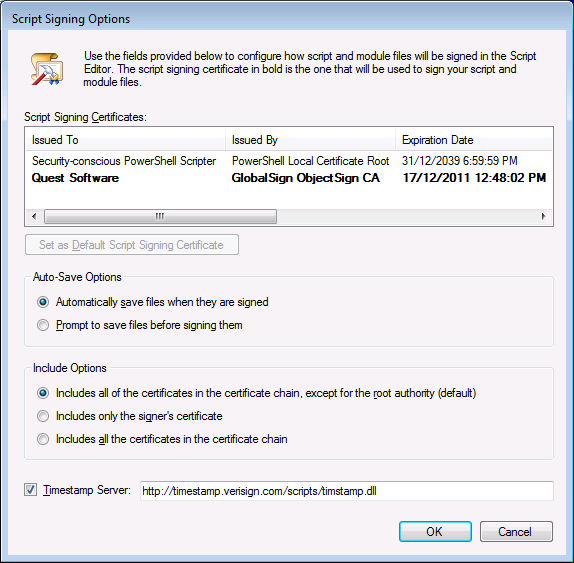
What sort of things can you do with Add-ons?  Well, for starters you can sign your script files:

image

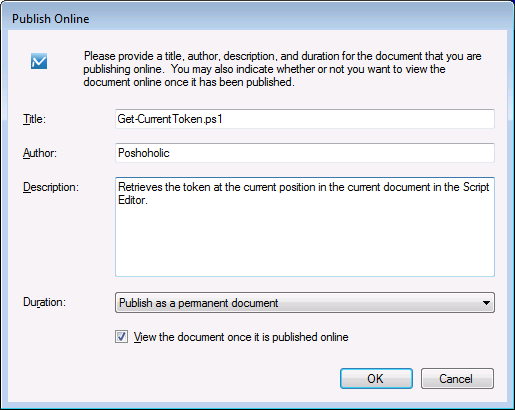
publish scripts online:

image

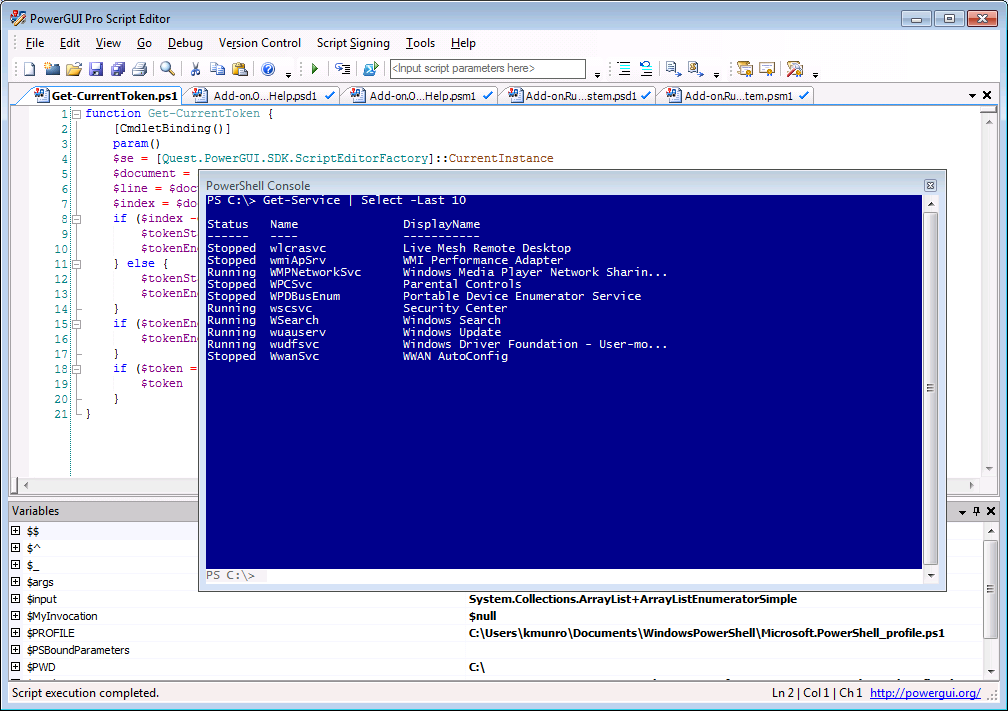
or change your embedded PowerShell Console to blue:

image

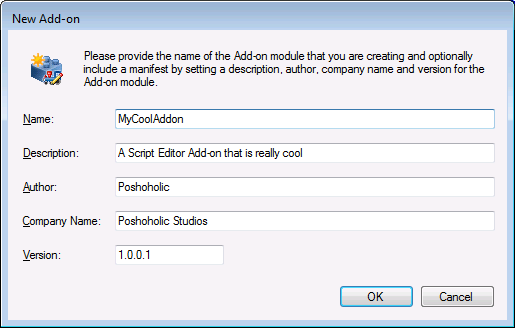
If that inspires you, you can also try creating your own Add-on:

image

And if you want to learn more about how you can create an Add-on, there’s even a tutorial available to help get you started.

There are some other useful Add-ons available right now, and more are in development so check the Script Editor Add-on category often to see what has been recently published.

If there are Add-ons you would like to see developed but you aren’t comfortable creating them yourself, share the ideas on our forums so that others can step up and help you out (or maybe even create the Add-on for you).

The Script Editor SDK that was added to this release is brand new to the PowerGUI product and we would love to hear your feedback on it.  Please speak up and let us know what you think about the SDK, the Add-ons we have made available so far, or anything else related to PowerGUI.  We’re always listening.

Thanks and happy scripting!

Kirk out.

Share this post:

Taking the PowerGUI Train Down to New Orleans

This weekend I’m heading down to New Orleans, LA for Tech·Ed 2010 North America.  I’m totally excited about the trip because (a) I’ve never been to New Orleans and (b) Tech·Ed is always a ton of fun!  This year I’ll be working the PowerShell booth again plus I’ll be hanging around the Quest booth quite a bit when I’m not in a breakout session.  One of the fun things I’ll be doing while I’m there is on Monday June 7th at 2:15 PM CST (mark your calendar!) when I’ll be at the Quest booth taking questions about PowerShell and PowerGUI and doing demos of some cool new features that we’ve been busy working on, such as a blue PowerShell Console and Online Help.

That’s not the only features that I’ll be talking about though…here’s another teaser screenshot showing you something else you’ll be able to do in the PowerGUI Script Editor really, really soon: Script Signing!

script signing code signing PowerGUI Script Editor

If you’d like to hear more about PowerGUI and what we’ve been up to, come by the 30 minute Q&A session on Monday.  Or, if you can’t make that session track down myself or Dmitry or head over to the Quest booth in the partner expo and ask for a demo of PowerGUI at any time.  I’d love to hear how you’re using PowerShell and PowerGUI and show you some of the new features that I haven’t shared here yet.

See you in New Orleans!

Kirk out.

P.S. I’m not literally taking the train down to New Orleans (although that would be really fun), but I am bringing PowerGUI with me on my laptop.  Maybe after the PowerShell market grows a little more I’ll be able to convince Quest to have a locomotive built for PowerGUI that we can use when travelling to events like Tech·Ed! 🙂

P.P.S. If you’re not going to Tech·Ed but you want to share how you’re using PowerShell and PowerGUI with me anyway, drop me a line anytime and tell me about it, or just share it on our forums!

Share this post :

Online help in the PowerGUI Script Editor

Today I’d like to share a little more of what I’ve been working on recently.  Here’s another teaser of something you’ll be able to get for free in the PowerGUI Script Editor very soon:

Online help in the PowerGUI Script Editor

And if you missed the cool Rock-Paper-Scissors support as well, go check out Tuesday’s blog post! 😉

More to come!

Kirk out.

Share this post:

Coming soon to a release near you

Hi everyone,

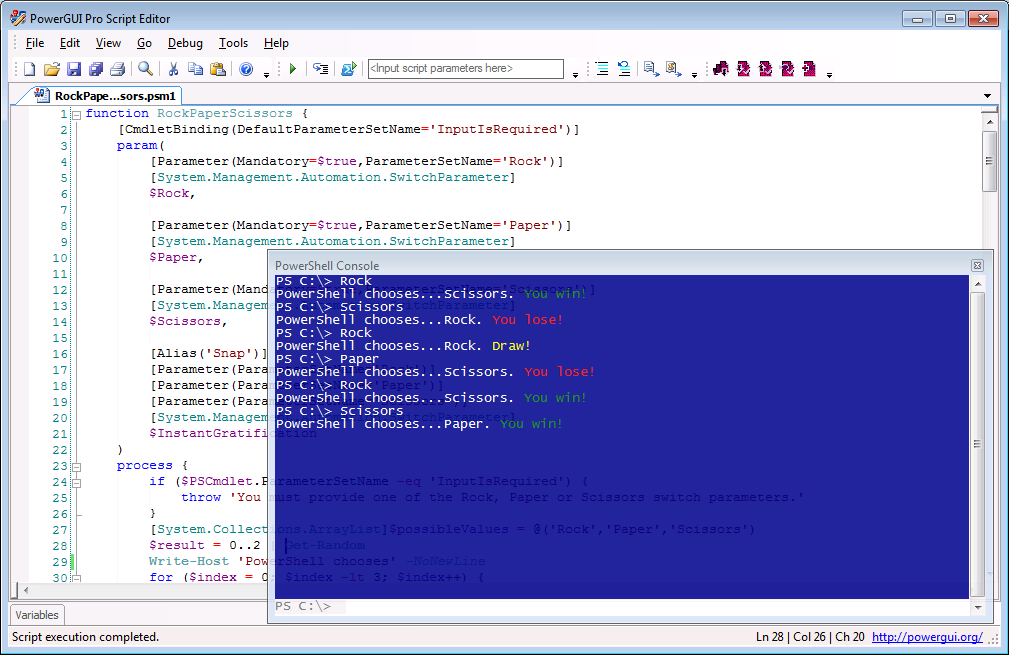
I’ve been really quiet lately while I’ve been focused on a bunch of fun projects that I’ve been working on for the next release of PowerGUI.  That release isn’t available just yet (soon though – watch this space!), but I can start sharing a few teasers to whet your appetites in the meantime.  Here’s a screenshot to share a little bit of what I’ve been working on recently:

     Blue console with transparency in the PowerGUI Script Editor

That’s right, it’s Rock-Paper-Scissors for Windows PowerShell!  No, no, that’s not it…look at the cool blue console with the transparent effect applied to it.

Some neat things like this and more are coming your way soon in PowerGUI!

Kirk out.

Share this post:

PowerGUI Pro is now available!

Extra! Extra! Read all about it!

PowerGUI has gone Pro!

You’re favorite PowerShell engine is now available in a cool new package.  PowerGUI Pro has all of the same great features that you know and love from PowerGUI Freeware plus it allows you to:

  • Use PowerShell from your favorite mobile device with MobileShell!
  • Protect your scripts using integrated version control!

All that and you get full commercial support from Quest Software to boot!

If you hurry you can buy it for only $99/user for the first 60 days.  After that, it will return to the regular price of $199/user.

Want to learn more?  You can read all about it here:

http://www.quest.com/PowerGUIPro

If you have any questions or want to learn more, feel free to leave a comment or post your question on our forums.

Thanks,

Kirk out.

Share this post: