Taking the PowerGUI Train Down to New Orleans

This weekend I’m heading down to New Orleans, LA for Tech·Ed 2010 North America.  I’m totally excited about the trip because (a) I’ve never been to New Orleans and (b) Tech·Ed is always a ton of fun!  This year I’ll be working the PowerShell booth again plus I’ll be hanging around the Quest booth quite a bit when I’m not in a breakout session.  One of the fun things I’ll be doing while I’m there is on Monday June 7th at 2:15 PM CST (mark your calendar!) when I’ll be at the Quest booth taking questions about PowerShell and PowerGUI and doing demos of some cool new features that we’ve been busy working on, such as a blue PowerShell Console and Online Help.

That’s not the only features that I’ll be talking about though…here’s another teaser screenshot showing you something else you’ll be able to do in the PowerGUI Script Editor really, really soon: Script Signing!

script signing code signing PowerGUI Script Editor

If you’d like to hear more about PowerGUI and what we’ve been up to, come by the 30 minute Q&A session on Monday.  Or, if you can’t make that session track down myself or Dmitry or head over to the Quest booth in the partner expo and ask for a demo of PowerGUI at any time.  I’d love to hear how you’re using PowerShell and PowerGUI and show you some of the new features that I haven’t shared here yet.

See you in New Orleans!

Kirk out.

P.S. I’m not literally taking the train down to New Orleans (although that would be really fun), but I am bringing PowerGUI with me on my laptop.  Maybe after the PowerShell market grows a little more I’ll be able to convince Quest to have a locomotive built for PowerGUI that we can use when travelling to events like Tech·Ed! 🙂

P.P.S. If you’re not going to Tech·Ed but you want to share how you’re using PowerShell and PowerGUI with me anyway, drop me a line anytime and tell me about it, or just share it on our forums!

Share this post :

Online help in the PowerGUI Script Editor

Today I’d like to share a little more of what I’ve been working on recently.  Here’s another teaser of something you’ll be able to get for free in the PowerGUI Script Editor very soon:

Online help in the PowerGUI Script Editor

And if you missed the cool Rock-Paper-Scissors support as well, go check out Tuesday’s blog post! 😉

More to come!

Kirk out.

Share this post:

Coming soon to a release near you

Hi everyone,

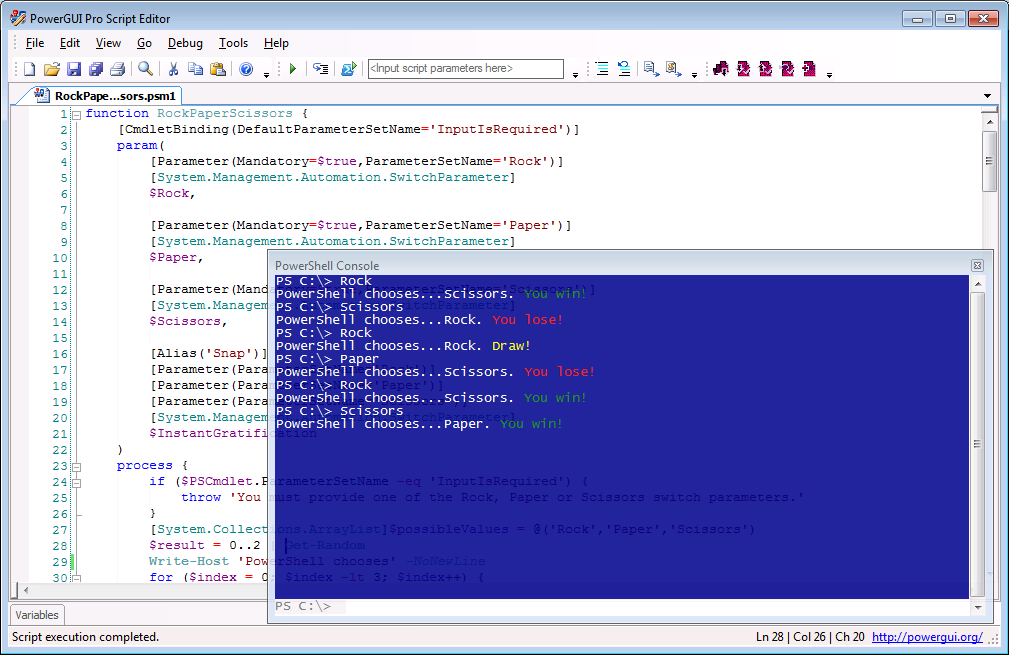
I’ve been really quiet lately while I’ve been focused on a bunch of fun projects that I’ve been working on for the next release of PowerGUI.  That release isn’t available just yet (soon though – watch this space!), but I can start sharing a few teasers to whet your appetites in the meantime.  Here’s a screenshot to share a little bit of what I’ve been working on recently:

     Blue console with transparency in the PowerGUI Script Editor

That’s right, it’s Rock-Paper-Scissors for Windows PowerShell!  No, no, that’s not it…look at the cool blue console with the transparent effect applied to it.

Some neat things like this and more are coming your way soon in PowerGUI!

Kirk out.

Share this post:

PowerGUI Pro is now available!

Extra! Extra! Read all about it!

PowerGUI has gone Pro!

You’re favorite PowerShell engine is now available in a cool new package.  PowerGUI Pro has all of the same great features that you know and love from PowerGUI Freeware plus it allows you to:

  • Use PowerShell from your favorite mobile device with MobileShell!
  • Protect your scripts using integrated version control!

All that and you get full commercial support from Quest Software to boot!

If you hurry you can buy it for only $99/user for the first 60 days.  After that, it will return to the regular price of $199/user.

Want to learn more?  You can read all about it here:

http://www.quest.com/PowerGUIPro

If you have any questions or want to learn more, feel free to leave a comment or post your question on our forums.

Thanks,

Kirk out.

Share this post: